.png?width=1200&height=628&name=Poz_google_ad_pic_transparent%20(2).png)

Great audiobook performances start long before recording begins. Pronunciation research, character consistency, and organized prep all play a major role in reducing pickups and keeping narration sessions running smoothly.
At Pozotron, we’ve developed a suite of script preparation features that are tailor-made to streamline your audiobook narration experience and to help stop pickups before they even happen.
If you are new to Pozotron, this article is a great way to understand the benefits of using these features before you start your narration journey.
The Foundations: Understanding Each Feature
Pozotron’s Script Prep Tools are built around three main features:
Each plays an important role in preparing your manuscript before recording begins and can help reduce the amount of time spent manually organizing notes, researching pronunciations, and tracking character information.
Pronunciation Research
Accurate pronunciations are key to a successful audiobook, but pronunciation research can be incredibly time-consuming, especially in projects with fantasy terminology, technical language, or uncommon names.
Pozotron’s Pronunciation Guide was designed to streamline that process.
The system scans your manuscript and automatically extracts:
- complex words
- rare terms
- foreign language words
- difficult names and locations
These words often require additional research before recording begins. The Pozotron interface allows you to review the generated list and choose which words you would like to add to your pronunciation guide.
Once you have chosen the words you would like to add to your list, our integrated dictionaries will automatically pull in the pronunciation (if it exists).
Our dictionaries include:
- Oxford (US)
- Oxford (GB)
- Forvo
- Merriam-Webster
- OneLook
- YouGlish
- HowJsay
In addition, you can record your own pronunciation references directly inside Pozotron, helping you keep all your prep materials centralized and easy to access during recording.
You can also customize how aggressively Pozotron flags foreign or complex words using Suggestion Sensitivity settings, allowing you to tailor the prep process to the needs of the manuscript.
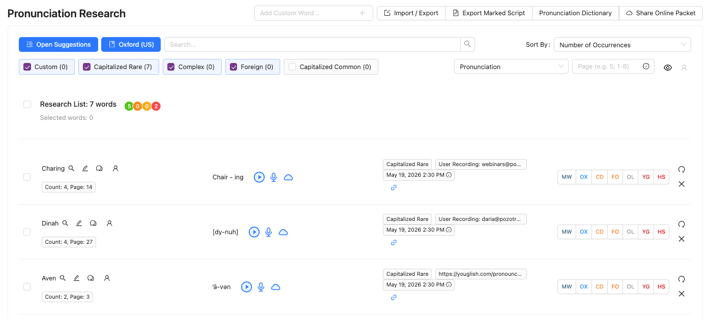
Let’s not forget that this tool was also built with collaboration in mind. Our Pronunciation Guide can be easily shared with authors or rights holders, who can record different pronunciations for you, helping you to ensure that you are on the right track.
Finally, if Pozotron doesn't automatically find a word you would like on your list, it's as simple as typing in that word in our "add custom word" box, and it will process that word just like the automatic suggestions.
For more information on how our Pronunciation Guide works, check out this video tutorial.
Character Voice Guide
The next feature that we have in our Script Prep Tools is our Character Voice Guide, which is the perfect way to ensure consistency in character voices throughout an audiobook and especially across multi-title book series.
Much like the Pronunciation Guide, Pozotron automatically scans the manuscript and identifies character names throughout the text.
From there, narrators can:
- Record several different character voice references
- Create image profile reminders
- Add character notes
- Include accent cues
- Organize personality or relationship information
This creates a centralized reference system that can easily be revisited during recording sessions.
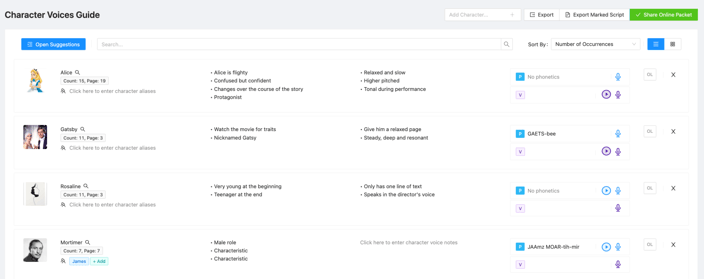
This is also especially useful when it comes to collaborating with the rights holder on how each character should sound, ultimately avoiding you having to go back and re-record all character dialogue.
In some projects, Pozotron may also automatically identify descriptive information about characters directly from the manuscript and add it to the Character Guide. These entries are marked with an “AI” tag, indicating the information was automatically pulled from the text to help support prep and character consistency.
Interested in seeing how a multi-series book would work with our Script Prep Tools? Take a look at our Transfer Research feature here.
Automated Script Markups
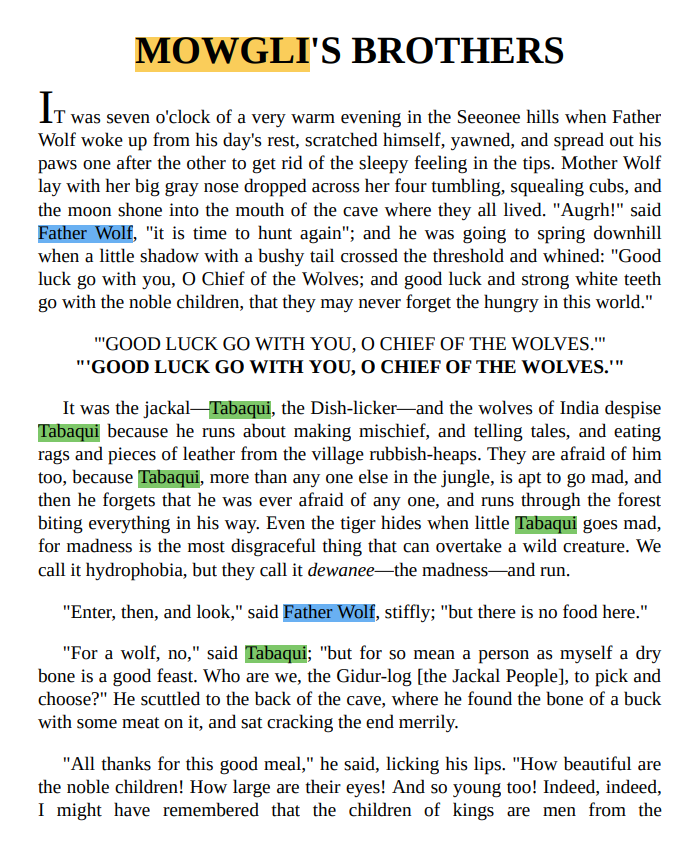
Once you have finished your pronunciation and character voice research, you have the option to export a ready-for-narration manuscript with automatic script highlighting and phonetic pronunciation comments as well as character notes.
This allows narrators to keep pronunciation notes, character reminders, and prep references directly inside the manuscript they’re recording from, reducing the need to jump between multiple documents during a session and hopefully eliminate pickups.
Core Benefits of Using Our Script Prep Tools
In a time where attention to detail and authentic human narration is paramount, Pozotron's script preparation tools can help you stand out and deliver outstanding performance. Above all, it can help you with the following:
- Efficiency: Streamline your preparation process, saving valuable time that can be dedicated to focusing on the creative elements of your performance.
- Accuracy: Minimize errors and mispronunciations, ensuring a high-quality and professional narration that resonates with your audience.
- Consistency: Maintain the same pronunciation and emotional delivery, enhancing the overall cohesiveness of your narration.
How to Get Started
Pozotron's script preparation tools are a must-have for every audiobook narrator and voice over actor aspiring to deliver exceptional performances.
From conquering complex pronunciations to delivering authentic character performances, these features will help elevate your craft and captivate audiences like never before.
To get started, we invite you to book a call with our team.
During this call, we will get to know your unique workflow and show you how our script prep tools can help. From here, you will get access to a free trial so you can ensure it works for you.
If you prefer to ask a few more questions before getting started, you are also welcome to email us at help@pozotron.com.